When a user is looking at your design, in addition to a clean-looking layout, it's important to use better spacing to make the UI feel more breathable. Along with better spacing, we also need to present data in an optically aligned way.
This becomes more important when the UI has a lot of data and elements to show. Consider a hero section that has a headline, a small description, and 2 relevant actions to onboard users. In this example, even more than the colors we use for the primary button, the position of the Get started button becomes important.
Start creating finance agents using templates from the marketplace
Create powerful finance agents using ready-made, customizable templates available in the marketplace.
The example above uses a basic spacing rule that highlights the exact elements we want to show the customer. Because the description text is relatively less important, it uses a secondary text color and sits close to the main heading.
The heading has font-semibold and tracking-tight and a higher font-size so that it holds more visual attention.
For the spacing between hero section title and description, we are using 16px as vertical spacing. Using 8px as the base spacing unit, the next spacing used between the hero description and buttons container is the (spacing between title and description) + (base spacing unit) = 16px + 8px = 24px.
Now for the spacing between the primary and secondary button, we are going to use the exact spacing used between title and description.
Start creating finance agents using templates from the marketplace
Create powerful finance agents using ready-made, customizable templates available in the marketplace.
The above shared spacing units are geometrically added, which means if there is some extra leading space coming from headings and paragraph texts, that will be included in the total optical spacing as well.
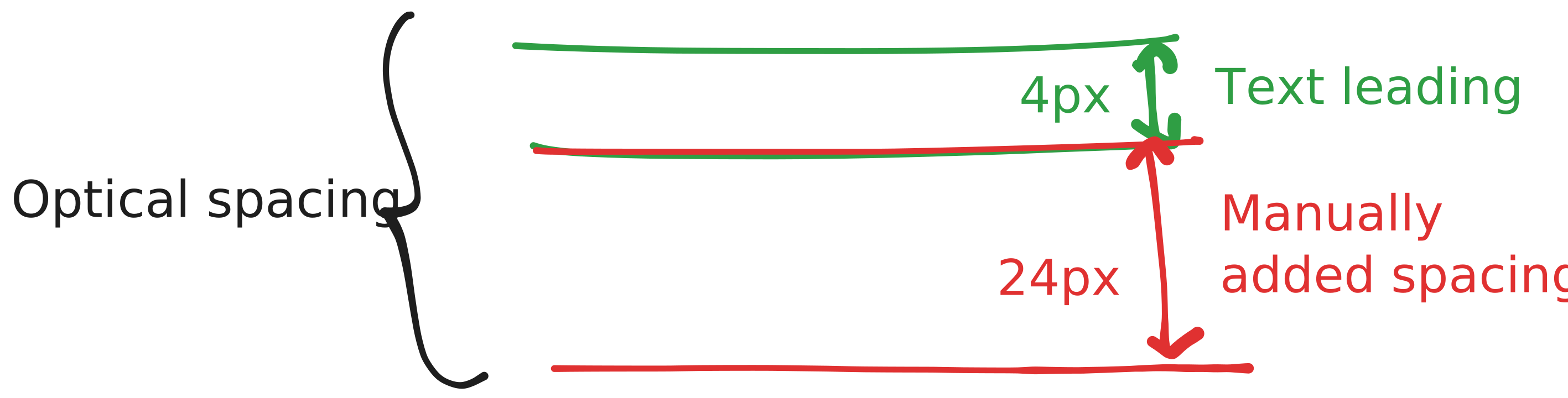

To keep the spacing consistent in these types of conditions, we can reduce the base spacing unit to 4px so that the total optical spacing becomes 24px.